v0.1.39
- Fix: when old chats were cleared at login (Settings > Storage), each one could cause a Lua error before the Hush window had been opened.
Communication
A modern whisper messenger for WoW: Forever. Every conversation in one window, grouped by player, searchable across all your characters, with a reply popup that never shows in combat.
Hush is a whisper messenger for World of Warcraft: Forever. Instead of whispers scrolling past in the chat frame, every conversation gets its own place in one window, grouped by player and marked when it is unread. Players you have not talked to before land in Requests until you answer, so a stranger never buries your friends.
Hush knows your alts. Read the conversations of your other characters, or search all of your characters at once, from whichever one you are playing. A small popup lets you answer an incoming whisper straight away, and it never shows in combat. Save any message and it stays in the Saved tab even if the conversation is deleted, keep your common answers one click away, and mute a chat for ten minutes, an hour, eight hours or until you unmute it, without blocking the person.
Set a status (Available, Away, Busy, Raid or Combat), each with its own answer text. Away, Busy and Raid use the game's own AFK and DND, so even whispers during a boss fight get an answer. What you typed but did not send is kept across a /reload, slash commands like /rw and /roll work in the Hush input, and you choose between the Allemano look and Blizzard Style.
Hush is also the core of a small family of WoW addons: Hush Feed sorts Trade, General, LFG and Services chat into one feed, Hush LFG puts groups and players in one list, and Hush Recruit helps with guild recruitment. Install only the ones you want.
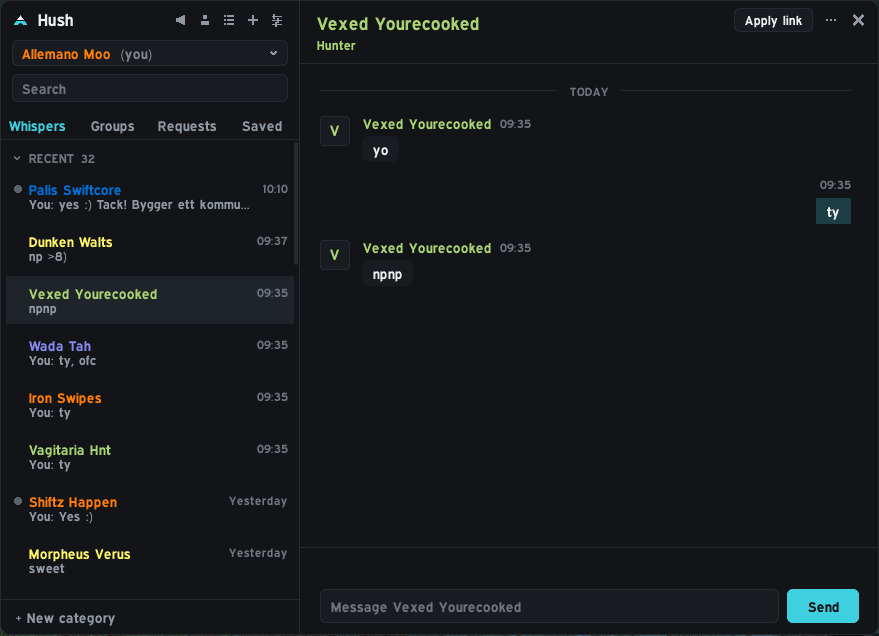
Whispers are grouped per player in a clean list with unread markers. Unknown players land in Requests until you answer.
Read the chats of your other characters, or search all characters at once, from whichever one you are playing.
Incoming whispers show a small popup you can answer straight away. Never in combat.
The Allemano look by default, or one of the other themes, including Blizzard Style if you prefer the classic feel. Fonts and accent color are yours to pick.
Save any message. It stays in the Saved tab even if the conversation is deleted.
Keep your common answers one click away.
Make a chat quiet for 10 minutes, an hour, 8 hours or until you unmute it. It still arrives and is kept, but plays no sound, shows no popup and adds nothing to the unread badge.
What you typed but did not send is kept for every chat, also across a /reload, and the list shows Draft: before it.
Available, Away, Busy, Raid and Combat, each with its own answer text. Away, Busy and Raid use the game's own AFK/DND, so even whispers during boss fights get an answer, and Hush can switch to Raid or Combat by itself.
Slash commands like /rw, /p, /roll and /w work in the Hush input, and web addresses in conversations are links you can copy.
Separate addons that plug into Hush. Install only the ones you want; each needs Hush.
Hush_Feed v0.1.2
Trade, General, LFG and Services chat sorted and filtered into one feed, with saved searches.
Hush_LFG v0.1.0 In progress
Groups and players from chat and the Group Finder in one list. Needs Hush Feed too.
Hush_Recruit v0.1.9
Guild recruitment: channel ads, apply link and candidate tracking.
Interface/AddOns/Hush, with the .toc file directly inside./reload.Downloaded it from GitHub instead of CurseForge? The folder will be called something like Hush-main. Rename it to Hush, or the game will not load the addon.
/hush | Open or close the window |
/hush settings | Settings |
/hush status away | Set your status (back = Available) |
/hush filter | Toggle hiding whispers in the default chat |
/hush report | Copy diagnostics for a bug report |
v0.1.39
v0.1.38
v0.1.37
v0.1.36
v0.1.35
v0.1.34
v0.1.33
v0.1.32
v0.1.31
v0.1.30
v0.1.29