v0.8.3
- /ab errors test records a test error, to check that errors reach the list and Allemano Hub.
Characters
An overview of all your characters, side by side. Log in once on each character and AltBoard remembers their gold, professions, currencies, reputation, gear, bags and bank.
AltBoard is an alt tracker for World of Warcraft: Forever. Log in once on each of your characters and AltBoard remembers their gold, professions, currencies, reputation, gear, bags and bank. From then on you see all of them side by side on one board, from whichever character you are playing.
The board has your characters as columns and everything that matters as rows. Reorder, hide and fold the rows until it shows what you care about. Looking for an item? Search the bags, bank and equipped gear of every character at once, with the total and who has it, or type /ab find and the name of the item in the chat.
Every character also has a sheet with their gear, stats, bags and bank, with real item tooltips, so you can check what an alt is wearing or carrying without logging over to it.
AltBoard stands on its own and needs no other addon. If you use Hush it picks up Hush's accent colour, so the two look like one product. Like every Allemano addon it is free and made only for WoW Forever.
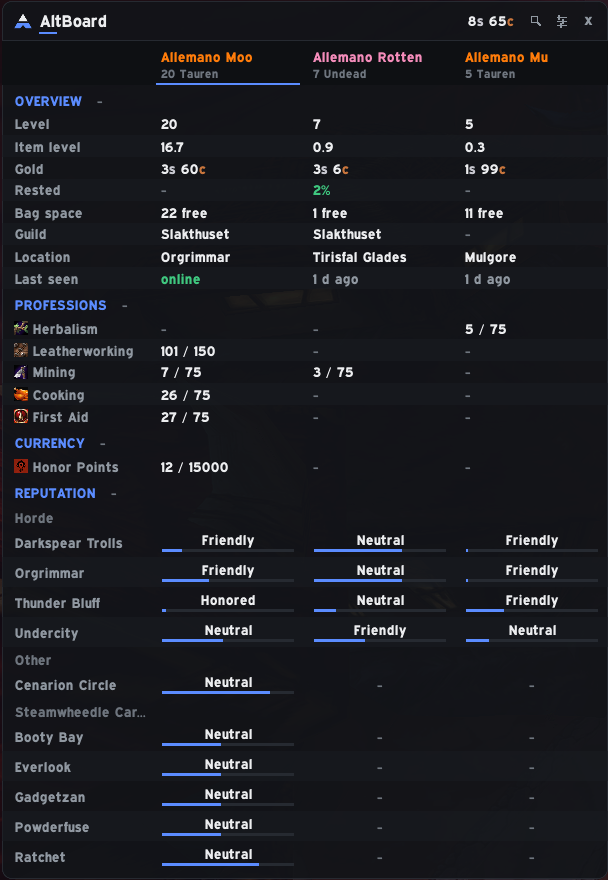
Characters as columns, everything that matters as rows. Reorder, hide and fold to taste.
Search every character's bags, bank and equipped gear, with the total and who has it.
Gear, stats, bags and bank for each character, with real item tooltips.
Needs nothing else. Picks up Hush's accent color if you use Hush.
Interface/AddOns/AltBoard, with the .toc file directly inside./reload.Downloaded it from GitHub instead of CurseForge? The folder will be called something like AltBoard-main. Rename it to AltBoard, or the game will not load the addon.
/ab | Open the board |
/ab find <name> | Search all characters for an item |
/ab settings | Settings |
/ab errors | Recent errors (Forever hides Lua errors) |
v0.8.3
v0.8.2
v0.8.1
v0.8.0
v0.7.3