v0.6.3
- The launcher button and the addon-list icon now look like the other Allemano addons.
Crafting
A guild crafting directory for WoW: Forever. CraftBoard remembers the recipes of all your characters, shares them with the guild members who also run it, and lets you search everyone's recipes in one window: who can make an item, who is online right now, and a one-click whisper to ask them.
Beta. Guild members share their recipes with each other, so CraftBoard gets better the more of your guild installs it.
CraftBoard is a guild crafting directory for World of Warcraft: Forever. It remembers the recipes of all your characters, shares them with the guild members who also run it, and lets you search everyone's recipes in one window: who can make an item, who is online right now, and a one-click whisper to ask them.
Search recipes and even reagents, filter by profession, and see how many crafters there are and how many are online. Crafters are listed online first, in their class colour, with the cooldown for recipes that have one. Whisper an online crafter with one click, or mail one who is offline. The reagents show how many you already own: hover for the tooltip, shift-click to link one, click to search the Auction House, or link them all at once. Item tooltips anywhere in the game tell you who in the guild can make the item.
Your own recipes are saved when you open a profession window, once per character. Sharing can be turned off, and only recipe IDs, skill levels and cooldowns are sent, and only to your own guild. CraftBoard gets better the more of your guild installs it.
Font, text size, accent colour and scale are yours to set. Like every Allemano addon, CraftBoard is free and made only for WoW Forever.
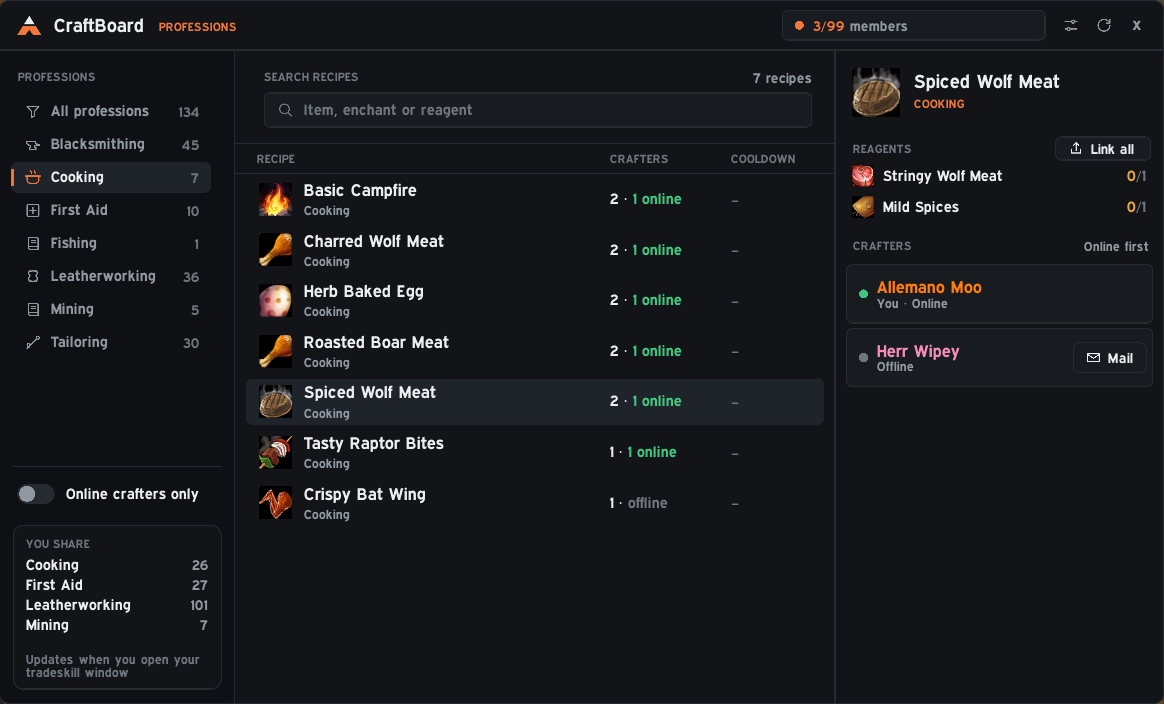
Search recipes and even reagents, filter by profession, and see how many crafters there are and how many are online.
Crafters are listed online first, in class color, with the cooldown state for recipes that have one. Whisper with one click, or mail an offline crafter.
Hover for the item tooltip, shift-click to link, click to search the Auction House, or link all reagents at once. It shows how many you already own.
Item tooltips tell you who in the guild can make the item, wherever you see it.
Open a profession window once per character and your recipes are saved automatically.
Font, text size, accent color and scale. Sharing can be turned off, and only recipe IDs, skill levels and cooldowns are sent, to your own guild.
Interface/AddOns/CraftBoard, with the .toc file directly inside./reload.Downloaded it from GitHub instead of CurseForge? The folder will be called something like CraftBoard-main. Rename it to CraftBoard, or the game will not load the addon.
/cb | Open CraftBoard |
/cb settings | Settings |
/cb sync | Ask the guild for recipes now |
/cb share on|off | Turn sharing your recipes on or off |
/cb errors | Recent errors (Forever hides Lua errors) |
v0.6.3
v0.6.2
v0.6.1
v0.6.0