Allemano Hub

Companion

A companion for the Allemano addons. It shows which of them you have and which version, tells you when a newer one is out, collects the Lua errors of all of them in one place, and shows which versions your guildmates run. The other addons never need it.

About Allemano Hub

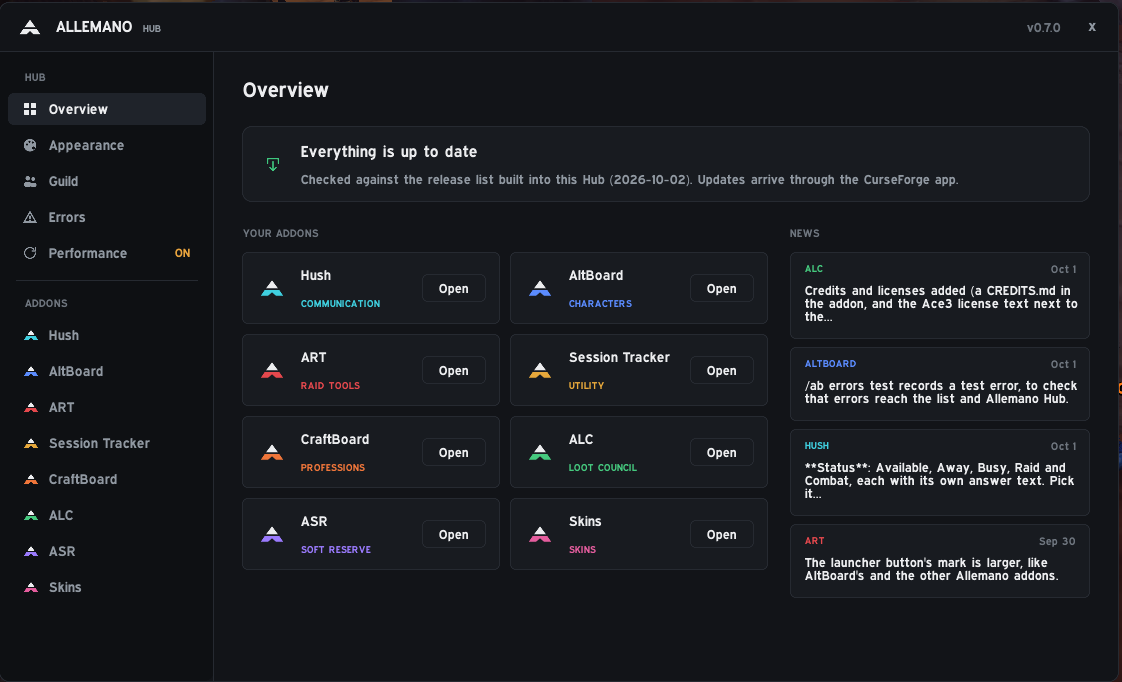
Allemano Hub is a companion for the Allemano addons in World of Warcraft: Forever. It shows which of them you have installed and which version, with a button to open each one, and a banner tells you when an update is out. The other addons never need it: install it if you want one place for all of them.

WoW Forever hides Lua errors. The Hub catches them from every Allemano addon, also the ones that keep no list of their own, and lists them newest first, with a small number on the launcher button when a new one arrives. Copy report builds a text with your versions and the latest errors, ready to paste into Discord when you report a bug.

The performance page shows how much memory every loaded addon uses, ours in their own colours, and, with script profiling turned on, how much CPU each one takes. Nothing is measured until you ask for it.

On the guild page you see which Allemano addons your guildmates run and which versions, so you know who is out of date before the raid. Only addon names and versions are shared, only with your guild, and you can turn it off. Font, size, accent colour, background and scale are yours to choose.

What it does

Overview

Every Allemano addon you have installed with its version, a button to open it, and a banner when an update is out. News from the latest releases below.

Errors in one place

WoW: Forever hides Lua errors. The Hub catches them from every Allemano addon, also the ones that keep no list of their own, and lists them newest first. A small number on the launcher button tells you when a new one arrives.

Bug report in one click

Copy report builds a text with your versions and the latest errors, ready to paste in Discord.

Performance

How much memory every loaded addon uses, ours in their own colours, and, with script profiling on, how much CPU each one takes, with the highest peak. Clean up memory frees what addons no longer use. Nothing is measured until you ask for the CPU.

Guild

See which Allemano addons your guildmates run and which versions, so you know who is out of date. Only addon names and versions are shared, only with your guild, and you can turn it off.

Appearance

Font, size, accent color, background and scale for the Hub window, and the launcher button on or off.

Install

  1. Easiest: open the CurseForge app, choose Forever, search for "Allemano" and click Install. Updates arrive there too.
  2. Or download the zip from the Files tab on CurseForge and extract it so the folder is Interface/AddOns/AllemanoHub, with the .toc file directly inside.
  3. Restart the game fully the first time, not only /reload.

Downloaded it from GitHub instead of CurseForge? The folder will be called something like AllemanoHub-main. Rename it to AllemanoHub, or the game will not load the addon.

Commands

/allemanoOpen or close the Hub (also /ah)
/allemano errorsList the latest errors in chat
/allemano reportCopy a bug report (with memory and CPU)
/allemano perfThe biggest addons by memory, in the chat (add mine for ours)
/allemano syncAsk the guild for addon lists

Changelog

All addons →

v0.10.0

  • A better problem report: Report a problem on the Overview page opens a report with a line for what you were doing, the newest errors in full (stack and local variables), the last things that happened (zone, combat, group, what Arbiter Loot Council and Soft Reserve were doing) and any CPU spikes.
  • CPU spike watch (Performance > Spike watch): with script profiling on, an addon that stays over a CPU limit (20 ms/s for 3 s by default) is logged with the zone and whether you were in combat. A chat warning and a sound are optional.

v0.9.1

  • Overview is the place for the addons now: each addon is a row with its version (orange when an update exists), memory use and recorded errors, and buttons for Open, Settings and a menu with What's new, the CurseForge link and Show errors.
  • Guild page: a Hub column shows which version of the Hub each guildmate runs, "Session" is now "Ledger", and a slider moves the columns sideways when there are more addons than fit.

v0.9.0

  • The Errors page can show the errors of every addon, not only Allemano's. The same error is shown once with how many times it happened, when it first came and its stack, and "Copy this error" gives the whole error to send. A flood of errors cannot fill the memory.

v0.8.0

  • A sound when an Allemano addon hits an error, with a choice of sound (the game's own and every sound other addons have registered) and a Test button.
  • Errors that go through a library are blamed on the right addon. Long dropdown menus scroll instead of spreading into columns.

v0.7.1

  • Fixed an error when opening the Hub with an addon without a picture (such as Allemano Arcade) installed. Session Tracker is now Allemano Ledger and opens with /ledger.

v0.7.0

  • New Performance page: memory per addon with bars, CPU per addon when you turn on script profiling (with a Peak column), Clean up memory, and a reminder if profiling was left on. The report now includes memory and CPU. The page remembers your filter and sorting.

v0.6.0

  • The Errors page now catches Lua errors from every Allemano addon, shows new ones at once, and the launcher button shows a number for errors you have not seen yet. /allemano errors test <AddonFolder> sends a test error.

v0.5.0

  • Guild page: who has which Allemano addons, and a newer version seen in the guild counts as an update.