Arbiter Loot Council

Loot · Arbiter

A loot council addon for WoW: Forever. The loot master starts a session for one item or a whole boss, every player answers on their own buttons, the council votes and the loot master awards. It suggests nothing: you decide.

Part of Arbiter, together with Arbiter Soft Reserve.

Beta test build. It is being tested in real groups and everybody in the raid needs the same version.

About Arbiter Loot Council

Arbiter Loot Council (ALC) runs a loot council for your raid in World of Warcraft: Forever. The loot master starts a session for one item or every item from a boss, every player answers on the loot master's buttons (BiS, Upgrade, Minor, Offspec and Pass by default), the council votes and the loot master awards. It suggests nothing: the council decides.

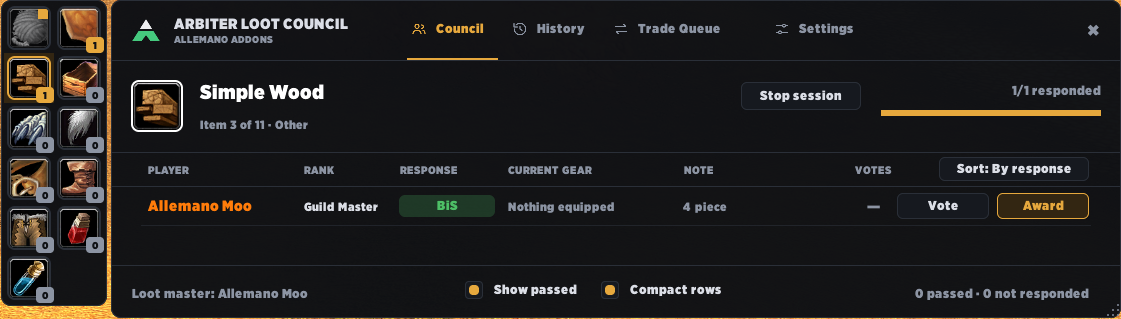
The council sees what it needs: each player's answer, note and guild rank, and, with Arbiter Context, what they wear in that slot, whether they already won loot in the same slot or this very item, and their loot history marked TONIGHT and this week. Ctrl-click a second player to compare the two side by side. Only the council sees the votes.

ALC also does the work around the decision. Open a corpse as master looter and it can take the loot for you after a "Loot all?" question. When you award, the trade window opens with the winner and the item already in it, and a short bar shows how long a Bind-on-Pickup item can still be traded. Items nobody wants go to a disenchanter or a guild bank character with one click.

Every award is logged with its answer and votes, and the history says what became of the item afterwards. A /reload does not lose the session. Taking over as loot master for a week? Copy your settings as a line of text and the other player imports them. Everybody in the raid needs ALC on the same version.

What it does

Many items, one session

Start every item from a boss at once. The council window shows them as icons on the left: click one to see who wants it.

Your own buttons

The loot master picks the answer buttons (BiS, Upgrade, Minor, Offspec, Pass by default, up to eight). Everybody in the raid sees the same ones.

Notes and rank

Players can write a short note on each item. The council also sees the guild rank of everyone who answers.

Council voting

Only the council sees the votes. Sort by response, votes, rank or name, and right-click a player to vote, award, change the answer or remove them.

Auto loot

Open a corpse as master looter and ALC can take the loot for you, after a "Loot all?" question, so the items sit in your bags before the session starts.

Award and trade

The trade window opens with the winner as soon as you award, with the item (one from a stack) already in it. A winner who is far away is asked by whisper to come. Every delivery is named in chat and noted in the history.

Arbiter Context and Compare

Click a candidate and a box shows everything about them: the note in full, what they wear in that slot, whether they already won loot in the same slot or this very item, and their loot history with TONIGHT and this week tags. Ctrl-click a second candidate to put the two side by side, with the better roll, votes and upgrade in green.

Share your settings

Taking over as loot master for a week? Copy your settings as a line of text, send it on Discord, and the other player imports it: they see what would change first, and Undo puts their old settings back.

Guild bank

Award an item to a guild bank character like you award to the disenchanter. It is queued for trade, logged as Guild bank and does not count as loot for that character.

History that follows the item

Every award in the history says what became of it: awaiting trade, returned, or traded on to somebody else. The council gets the same marks, and a button syncs the history to everybody on the council so there are no gaps.

BoP timer

A thin bar and a short text show how long a looted Bind-on-Pickup item can still be traded, read from the item's own tooltip.

Recovery and history

A /reload does not lose the session. Every award is logged, with the answer and votes it had, in a History tab.

Install

  1. Easiest: open the CurseForge app, choose Forever, search for "Allemano" and click Install. Updates arrive there too.
  2. Or download the zip from the Files tab on CurseForge and extract it so the folder is Interface/AddOns/ArbiterLootCouncil, with the .toc file directly inside.
  3. Restart the game fully the first time, not only /reload.

Downloaded it from GitHub instead of CurseForge? The folder will be called something like ArbiterLootCouncil-main. Rename it to ArbiterLootCouncil, or the game will not load the addon.

Commands

/alcList all commands
/alc menuWindow menu
/alc settingsCouncil list, loot quality, answer buttons and more
/alc add [item]Add an item to the loot list
/alc historyAwards so far
/alc testSolo test with items from your bags or made-up players
/alc pausePause or resume the session
/alc deAward the item to disenchant
/alc versionsWho in the raid has which version

Changelog

All addons →

v0.8.0-beta

  • A new Settings window: the pages are in a sidebar and follow what you want to set, not who you are. General and Appearance for everybody, then Master Loot, Council, Responses and Session for the loot master, and Tools (share settings, the debug log, who has the addon) at the bottom. Every setting is a card with a short description and its switch on the right, and the window opens on the page for your role.
  • Modules get a page of their own: Arbiter Soft Reserve's settings are on a Soft Reserve page, in its purple, instead of spread over the other tabs.
  • "Use Arbiter Loot Council in this raid?" The loot master is asked when they become the master looter and when they enter a raid instance. No pauses ALC for the loot master (no loot list, auto loot or sessions) and raiders are not affected. /alc on and /alc off change it by hand, and a setting turns the question off.
  • Who has the addon is a button on the Tools page (the same window as /alc versions).

v0.7.0-beta

  • History follows the item: the History tab says Awaiting trade, Returned (the winner gave it back) or Traded to X (the winner traded it on, the winner of the council stays the winner), and the raid chat says when an item is traded on.
  • Sync the history to the council: a council member who joins a session fetches the awards of the last days by itself, and the loot master has a Sync to council button in the History tab, so there are no gaps in Recent awards.
  • Item tooltips anywhere (bags, chat links) say who won an item awarded in the last week and what became of it.
  • Start LC is green and Start SR is purple in the Loot window, so the buttons are easy to tell apart.
  • Compare shows item tooltips, the time bar is clearer, names in the settings have their class colour, and the X of an item that awaits trade is blocked.
  • A Soft Reserve session stays open until the loot master closes it, and stackable items (green reagents) are split so one goes into the trade window.
  • Fix: a name the game hid (the trade partner in an instance) could cause a Lua error when the trade window opened.

v0.6.1-beta

  • Auto-pass (optional, off by default): Settings > Everyone, "Pass automatically on items I can never use". Items your class can never wear or wield (plate for a priest, leather for a warlock, a two-handed sword for a rogue) get a Pass when a session starts, marked Auto-passed, and you can still change the answer. Rings, necklaces, trinkets and cloaks are never passed.
  • Answered rows stand out in the Loot Response window: a bar and a tint in the colour of your answer, so with many items you see at a glance what is left.

v0.6.0-beta

  • Share your loot master settings: Copy my settings gives a line of text with your council, threshold, answer buttons, timer and more to send on Discord; Import settings shows what would change before anything is applied, and Undo puts the old settings back.
  • Award to the guild bank, like Disenchant: set a guild bank character and a Guild bank button appears in the Council window. The item is queued for trade and logged as Guild bank.
  • A time bar along the header of the Loot Response window runs out with the answer timer.
  • The Results button is only shown in Soft Reserve sessions, not in a plain loot council session.

v0.5.2-beta

  • Fix: Trade complete could cause a Lua error when the game hid the message as a secret text, and the trade was then not marked as delivered in the Trade Queue.

v0.5.1-beta

  • Tells Allemano Hub what the session is doing (when the Hub is installed): a session started or ended, an award given or taken back, a pause, the answer timer running out. The lines show up under Recent activity in the Hub's problem report.

v0.5.0-beta

  • Arbiter Context: click a candidate in the Council window and a box opens beside it with the note in full, what the player wears in that slot and the item level difference, a warning when they already got loot in the same slot (or this very item), and their loot history with TONIGHT / this week tags. Every council member needs this version to see the history.
  • Arbiter Compare: Ctrl-click a second candidate and the box becomes two columns side by side, with the better roll, votes and upgrade in green.
  • The award log can be trimmed: a reminder in chat when it gets long (never, 500, 1000 or 2000 awards) and /alc log trim <n> keeps the newest n; the older awards go to the same backup a cleared history uses.
  • Settings is easier to take in: the long Loot master tab is split into Loot and Session, five tabs in all.
  • The close cross is bigger in all windows, and Show passed / Compact rows in the Council window are smaller and further apart.

v0.4.5-beta

  • A warning about players without the addon: when you start a session the chat says which players did not reply to the version check, so you know who cannot answer. It can be turned off in Settings, Loot master.
  • A Results button in the Loot Response window, so every player can open the results from the window they answer in, and "Your roll" there: after the roll each item shows what you rolled and who leads (or that you won, passed or did not answer) instead of the closed answer buttons.
  • The Loot window shows what an addon knows about an item (Soft Reserve's "SR x3") and marks its start button, and other addons can add a section to the Settings window.

v0.4.4-beta

  • Fix: in a Soft Reserve session the mark in the Loot Response window was purple all over. It is now like the Soft Reserve mark: only the lower part of the A is purple and the upper part stays white.

v0.4.3-beta

  • When every item of a session has been awarded the Loot window says "All awarded. The session closes by itself." instead of "In session": the session stays open for 90 seconds so that an award can be undone, which made it look as if it was still running.

v0.4.2-beta

  • An item a winner gives back can go in the list again: when a player you awarded an item to trades it back to you, the Loot window shows "<name> gave back <item>" with Add (a new waiting item) and a cross to leave it. No command needed.
  • The Result window says when an item was handed to a player for disenchanting ("Disenchanted by <name>" instead of "Nobody").
  • More compact windows: a lower title row in every window, a one-line title in the voting window, a shorter Settings window, and the winner's name in the Loot window in their class colour.

v0.4.1-beta

  • Start LC and Start SR: when Arbiter Soft Reserve is installed, every item in the Loot window gets two buttons, Start LC (a normal Loot Council session, as always) and Start SR (a soft reserve session), and the footer has Start all LC and Start all SR. Without Arbiter Soft Reserve nothing changes.
  • A session started by Arbiter Soft Reserve looks like it: the Loot Response window the players see says SOFT RESERVE RESPONSE with a purple mark, and the item in the loot master's Loot window gets a purple frame while it is in session. A normal Loot Council session is unchanged.
  • The window menu of the minimap button is headed ARBITER and can hold the rows of other addons under a heading of their own (Arbiter Soft Reserve adds Results, Session and Import list). The Result window can show a player who reserved an item and never answered (Did not answer).

v0.4.0-beta

  • A small API for other addons to build on Arbiter Loot Council; Arbiter Soft Reserve is the first. A normal Loot Council session works exactly as before.
  • Used by Arbiter Soft Reserve, not by a normal Loot Council session: a Result window (/alc results) that shows everybody the outcome of items decided by rolls, and Award all, one question that hands out a whole list of winners with the usual announcement, history and trade queue.
  • Players with an older version can still answer as before.

v0.3.4-beta

  • Credits and licenses added (a CREDITS.md in the addon, and the Ace3 license text next to the libraries). No changes to the addon itself: it works exactly as 0.3.3.

v0.3.3-beta

  • Fix for "script ran too long" when a window was opened: the windows now build their rows as needed and the rest in the background.
  • Only one item of a stack goes into a trade. The loot window no longer shows the last chat announcement.

v0.3.2-beta

  • Fix: council members now see awards, the end of a session and the history (messages from the loot master could overtake each other and be thrown away).
  • Auto loot with a "Loot all?" question, a BoP trade timer read from the item tooltip (4 hours), the game's own loot threshold follows ALC's, and the answer counter no longer counts you twice in a raid.
  • Much tighter Compact windows, a Window size setting (70-100%) and a lower item panel in the voting window.

v0.3.1-beta

  • Fix: the loot window failed to open when the boss name was a secret text.
  • Votes, answers and awards go in the fast lane and your own vote shows at once. The trade window opens at award, winners far away are asked by whisper, trades are named in the chat, council members keep the history, players who have not answered are listed as Waiting, and the loot threshold offers Uncommon, Rare and Epic.

v0.3.0-beta

  • Answer timer, won items put into the trade window, undo award, pause and resume, random rolls, award to disenchant, a recent-awards column, a History with date list, search and export, a version window (/alc versions) and compact windows.

v0.2.0-alpha2

  • First test build on the site. Several items per session with an item strip, your own answer buttons, a note on every item, guild rank, sorting and a right-click menu for the council, and a Settings window split by role.