v0.16.2
- The sidebar lists only the tools that exist. The ones that are not built yet are hidden instead of marked SOON.
Raid tools
Raid tools for WoW: Forever. Everyone in the raid should have it: notes, ready check info and timers are shared between ART users.
Allemano Raid Tools, ART for short, is a set of raid tools for World of Warcraft: Forever. Notes, ready check information and timers are shared between ART users, so everyone in the raid should have it.
The raid leader writes notes with raid icons and class-coloured names, including lines that only certain players see, and sends them to the raid. For anything that is easier to draw than to write there is the visual note: draw on a map or a picture with pens, arrows, icons and text, and share it.
The raid check shows flasks, elixirs, food, buffs and durability for the whole raid, right in the ready check, so you know who is ready before the pull. Invite by guild rank or by keyword, save rosters and drag players between groups. Marking is quick: hold Ctrl and scroll over a mob to mark it, or give mobs their own icon lists and just scroll over the pack.
Start pull and break timers, make your own shared timers, and every boss pull is logged as a kill or a wipe in the pull log. ART goes well with Arbiter Loot Council and Arbiter Soft Reserve for the loot at the end of the night. Like every Allemano addon it is free and made only for WoW Forever.
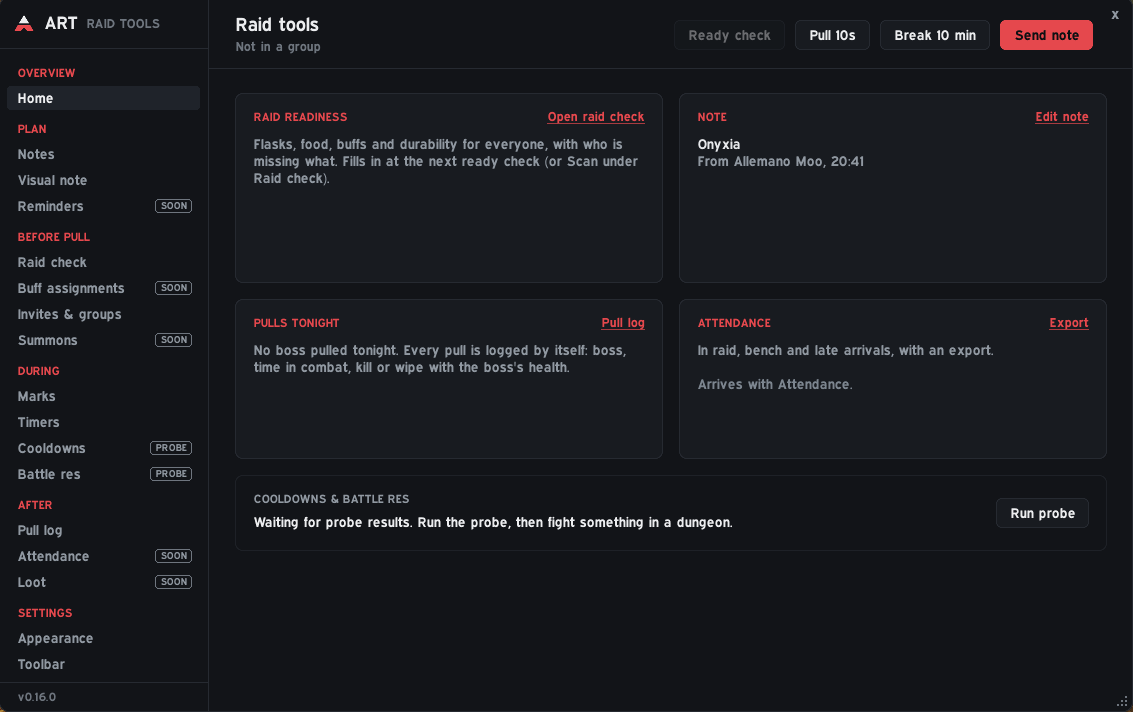
The raid leader writes and sends notes with raid icons, class-colored names and lines only certain players see.
Draw on a map or picture with pens, arrows, icons and text, and share it with the raid.
Flasks, elixirs, food, buffs and durability for the whole raid, right in the ready check.
Invite by rank or keyword, save rosters and drag players between groups.
Hold Ctrl and scroll over a mob to mark it. Give mobs their own icon lists and just scroll over the pack.
Pull and break timers, your own shared timers, and every boss pull logged as kill or wipe.
Interface/AddOns/AllemanoRaidTools, with the .toc file directly inside./reload.Downloaded it from GitHub instead of CurseForge? The folder will be called something like AllemanoRaidTools-main. Rename it to AllemanoRaidTools, or the game will not load the addon.
/art | Open ART |
/art note | Show the raid note |
/art vn | Visual note |
/art button | Hide or show the ART button |
v0.16.2
v0.16.1
v0.16.0
v0.15.1
v0.15.0